Grammarly VS Chatgpt VS editgpt: Which AI Writing Assistant Is The Best?
Grammarly vs ChatGPT? Find the best AI writing assistant for real-time proofreading, creative drafting, or professional editing.
After using and comparing the three, editGPT emerged to be the best AI writing assistant.
Choosing the best writing assistant usually comes down to whether you want a basic spellchecker or a machine that generates your entire draft. Many writers find themselves stuck in the Grammarly vs ChatGPT loop because they need a clean output while still sounding like their original voice.
And here’s also where editGPT comes in, combining these two in one tool.
You might be looking for simple typo fixes, or you could need a deeper look at the actual rhythm of your paragraphs. In this comparison, we’re breaking down how these platforms actually handle your work so you can stop wondering which one is worth your time and money.
We’ll be looking at the specific strengths of these three most loved tools to see where they fit into your daily tasks.
What Each Tool Is Built For
Every piece of writing tool in your setup has a specific role to play while you work on a manuscript. You will get through your draft much faster if you choose the right one for the current stage of your project.
Grammarly for real time proofreading and grammar
Grammarly stays active in your browser to catch small spelling and punctuation slips while you're typing. It’s very useful for keeping emails and quick notes free of typos that might make you look less professional. The latest 2026 updates even include proactive AI agents that help you stay on brand across different platforms.
ChatGPT for drafting, ideation, and rewriting
You can turn to ChatGPT when you need a fast outline or a few rough paragraphs to help you get moving on a blank page. It’s excellent for generating a large volume of ideas or exploring different ways to summarize a complex topic.
editGPT for precision editing with tracked changes
editGPT is the best option for the final polish because it provides deep clarity fixes with visible track changes. You get to see every single suggestion on the screen, which makes it easy to accept or reject edits individually. You can also import Microsoft Word files directly to keep all your original formatting while reviewing the changes.
Grammarly Overview
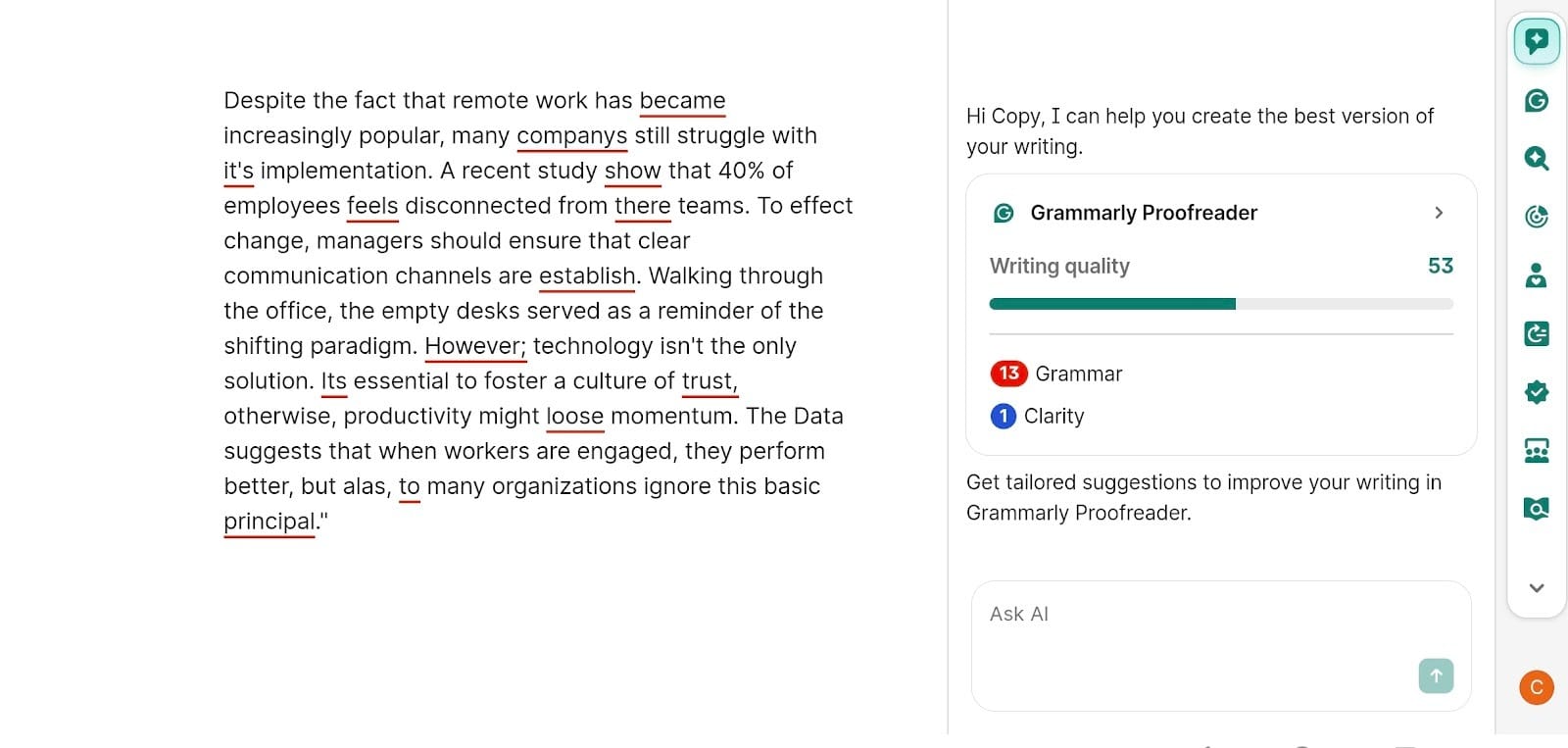
Does Grammarly use AI?
Grammarly is built entirely on AI technology. By now, it has moved way beyond simple word patterns. It now uses a sophisticated engine to figure out the actual point you’re trying to make. This helps the tool suggest better ways to word things based on the specific audience you are writing for.
Core features and strengths
Does Grammarly use AI?
Grammarly runs entirely on AI models. By 2026, the software has moved past simple pattern matching to actually understand the intent behind your writing. This allows it to offer corrections that fit the specific context of your project instead of just applying generic rules to every sentence.
Core features and strengths
Grammarly lets you cover your basic grammar, tone, clarity, and plagiarism checks. Its real power is how it follows you around the web. It sits in your browser or Word doc and offers suggestions while you type.
- Automatic grammar and spelling corrections
- Real-time tone detection
- Browser and desktop app integrations
- Clarity and conciseness suggestions
Limitations and value
The biggest downside is that the edits can feel a bit robotic and surface-level. It’s great for spotting a typo, but it gives you very little control over how it rephrases your work. It tends to correct your sentence if it sees it as too flowery or too long, as it doesn’t understand the nuance of your writing and the style you’re trying to follow.
ChatGPT Overview
How ChatGPT differs from Grammarly
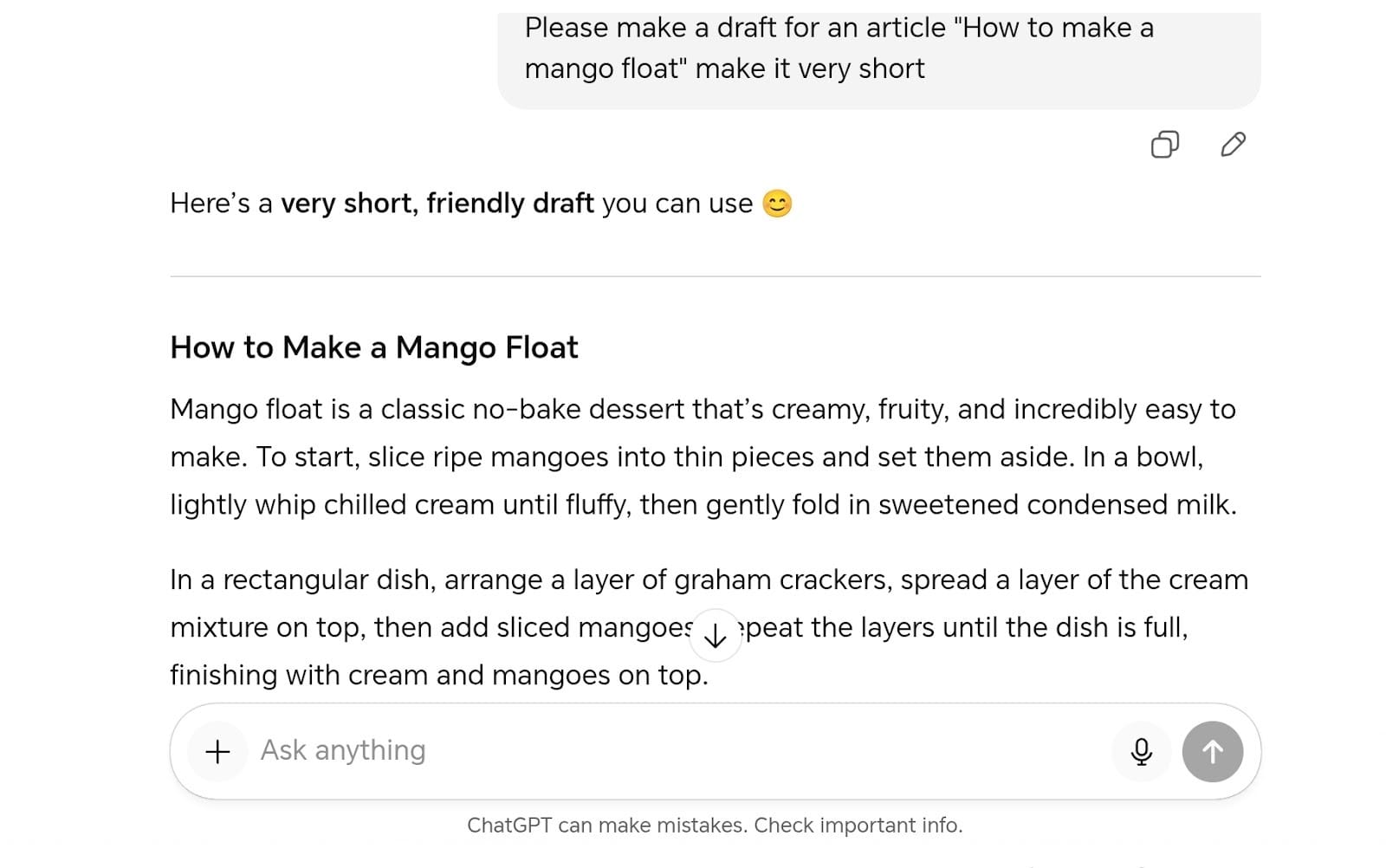
Grammarly is designed to sit in the background and fix mistakes while you type your own words. ChatGPT works the opposite way by acting as a partner that can generate entirely new text from a few basic prompts. Grammarly proofreads an existing text, ChatGPT generates one.
It’s much more powerful for building a document from scratch rather than just cleaning up a finished email.
Features and Strengths
- Fast drafting from prompts
- Creative brainstorming for outlines
- Massive restructuring of long sections
- Rough translation and summarizing
Limitations
- No real-time browser suggestions
- Lacks visible tracked changes
- Requires manual copy and pasting
- Can struggle with specific factual accuracy
Is ChatGPT better than Grammarly?
The answer depends on what you’re trying to do at this exact moment. If you need a quick second pair of eyes to catch a typo in a message, Grammarly is the superior choice. But if you’re staring at a blank screen and have no idea how to start your first chapter, ChatGPT is much more useful.
Most professionals end up using both tools to handle different parts of the writing process.
editGPT Overview
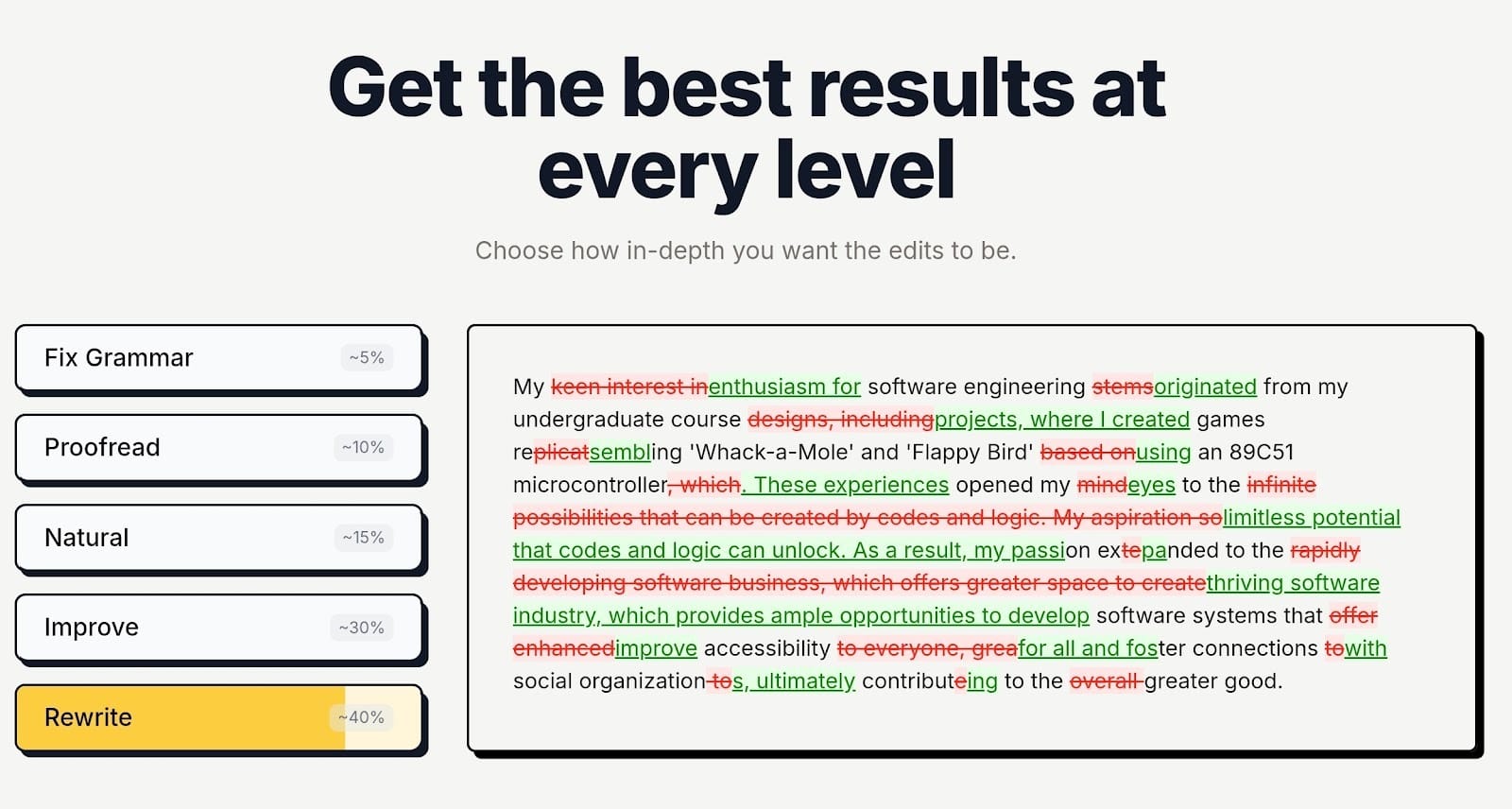
Imagine combining Grammarly and ChatGPT. editGPT is what you’ll get.
editGPT functions as a specialized editor that focuses on the actual quality and flow of your writing rather than just fixing typos.
It uses a very clean interface where you can drop your text and see exactly how to make your sentences more professional and clear. This writing tool is built for writers who have already finished their content but need to refine it until it’s ready for a final audience.
Authors love editGPT as it doesn’t make the text sound robotic and plain just to tighten it. It retains your original tone and voice, so the writing still sounds like you.
Key features:
- Visible track changes for every suggestion
- Direct Microsoft Word file imports
- Specialized modes for academic and creative writing
- Longform and batch editing
- Advanced clarity and flow improvements
- Browser extension for direct editing in other apps
How tracked edits work
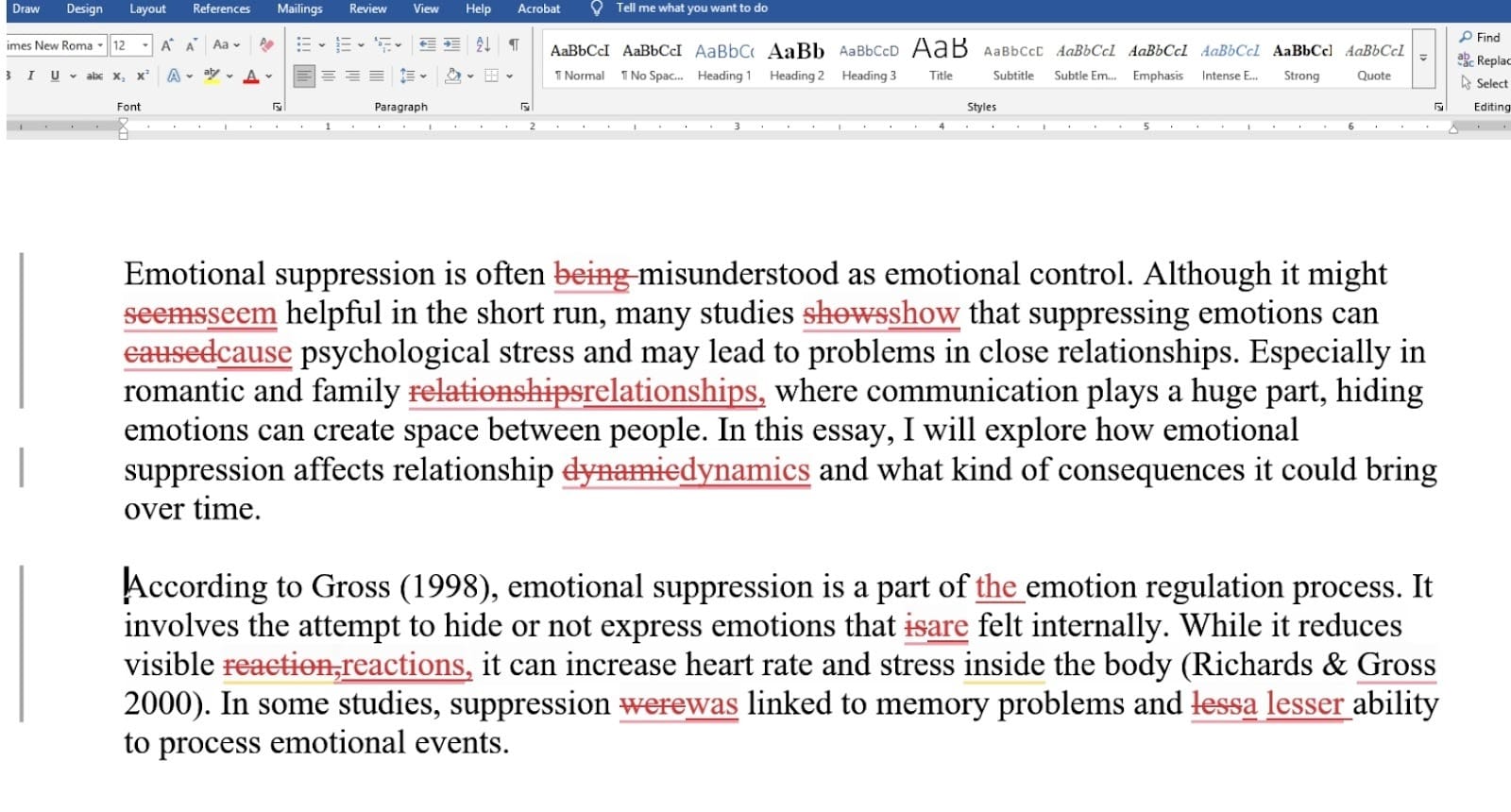
The standout feature here is the way it shows you every single change in a transparent format. You see exactly what words were added or removed in a red-and-green "track changes" view similar to Microsoft Word.
This allows you to review every suggestion one by one so you never lose control of your original meaning. You can accept all the changes at once or go through them individually to make sure the final result still sounds like you.
Best use cases
- Academic papers and research articles
- Professional reports and business emails
- Client-facing documents and resumes
- Short stories and book manuscripts
- Tightening up AI-generated drafts
Why editGPT is better for serious editing
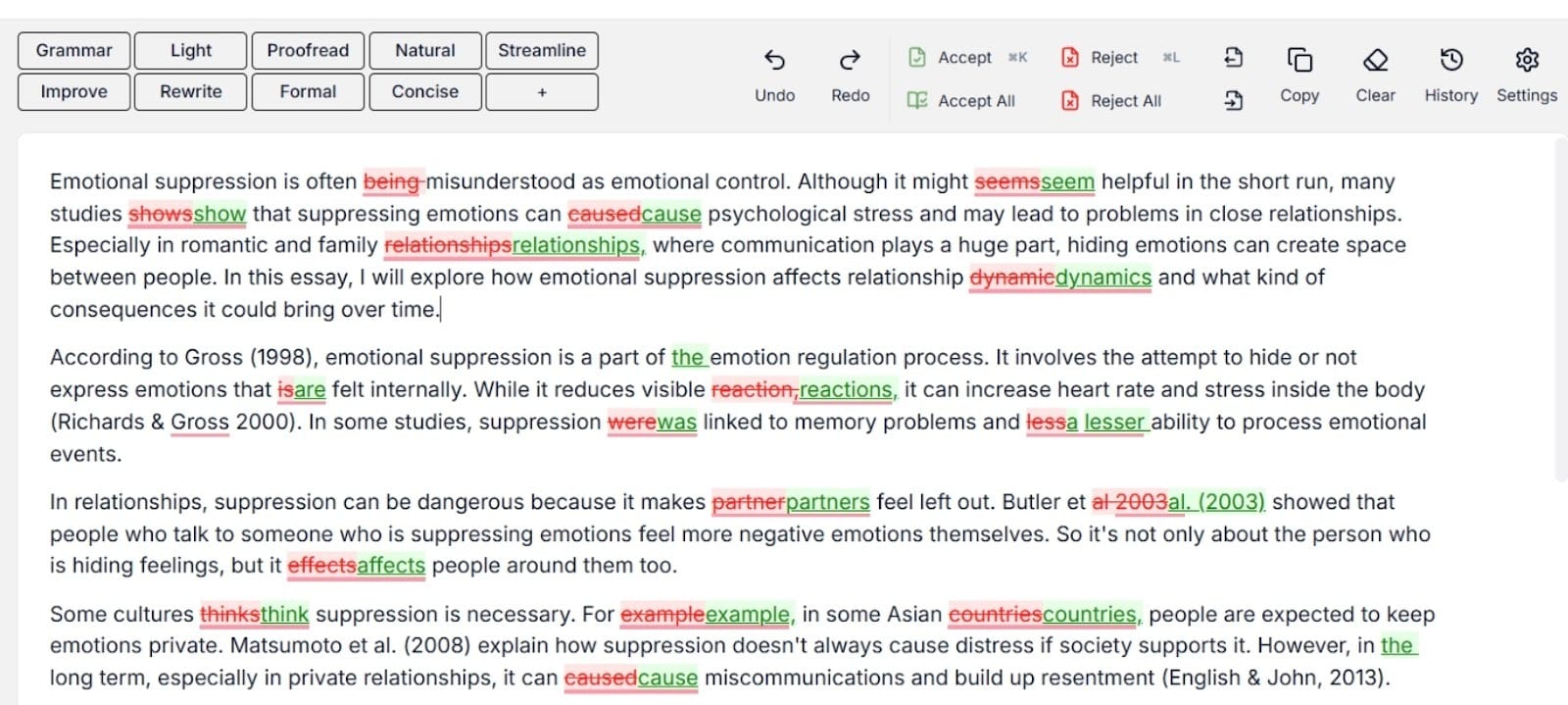
This tool is the best choice for serious work because it offers a level of precision that other assistants simply cannot match. It’s great for most use cases because it doesn’t just rewrite your text in a black box. It shows you the logic behind the improvements.
You get the benefit of a professional editor who helps you fix clunky phrasing and repetitive words without taking over your creative vision. It’s the most reliable way to ensure your work meets your high standard while maintaining total transparency over every edit.
Feature Comparison
Grammarly vs ChatGPT vs editGPT by Use Case
Your choice of tool depends on what you’re actually doing at your desk right now.
You might just need to fix a quick typo in a Slack message, or you might need to fix the entire flow of a 10,000-word research paper. I’ve broken down how these three stack up in real scenarios so you can stop wasting time with the wrong tool.
Real-time proofreading
Grammarly is the most popular choice for this task and reasonably so. It works while you type by sitting in your browser or email app and highlighting slips immediately. This is perfect for catching mistakes before you hit send on a quick reply.
While editGPT has a browser extension for similar fixes, its main focus is on deeper work rather than just catching a missed comma in an email. ChatGPT is pretty much useless for this since you have to copy and paste your text into a separate window just to find a single error.
Creative drafting
ChatGPT is the choice when you’re staring at a blank page and need a place to start. It can build a rough outline or write a few opening paragraphs based on a quick prompt.
Grammarly can help you rephrase a sentence you already wrote, but it isn't going to build a story for you. editGPT works best once you actually have a draft ready. Its job is to refine and polish your own ideas rather than inventing them for you.
Professional and academic editing
This is where editGPT stands out. It offers a level of precision that the other two lack. It’s built for the high standards of research papers, resumes, and client reports. You get specific suggestions that tighten your logic and remove repetitive words without making the text sound robotic.
Grammarly often misses these deeper flow issues, and ChatGPT tends to rewrite so aggressively that you lose your original meaning.
Edit transparency and control
editGPT is the only tool that gives you full "track changes" visibility. You see every single deletion and addition in red and green. This lets you review the logic behind every edit before you accept it.
Grammarly gives you a list of individual cards to click through, which could quickly get annoying and tiring for long documents. ChatGPT just gives you a new version of your text in a black box, leaving you to guess what actually changed.
Having this level of control is vital when you need to be 100% sure about every word in your final draft.
Grammarly vs ChatGPT Head to Head
Putting these two side by side shows how different their actual goals are. One is built to stay in the background while you write, and the other is meant to do the groundwork for you.
Here are thee specific areas where one pulls ahead so you can pick the right one for your next project.
Where Grammarly wins
Grammarly is much better at catching mistakes as they happen. You don't have to leave your document to get a second opinion on your spelling. Its main strength is the convenience of a proofreader that follows you through every app you use.
You get instant alerts for punctuation slips and typos before you hit send. It also has a real plagiarism checker, which you won't find in a standard chat window.
Where ChatGPT wins
ChatGPT is the clear choice for building a draft from nothing. It can take a few messy notes and turn them into a full paragraph in seconds.
Grammarly might help you tweak a single sentence, but ChatGPT can overhaul a whole page to shift the tone. It handles complex directions well, like asking it to simplify a long report for a new reader. These are creative tasks that a standard grammar checker isn't designed to do.
Where both fall short
Both platforms often fail to capture your writing’s unique personality. They tend to suggest safe, generic phrasing that makes your work feel like a corporate template.
Neither tool offers a clear way to see exactly what changed in a "track changes" view. This makes it difficult to verify deep edits. You also have to stay alert regarding factual accuracy. Both tools focus on how the words look rather than whether the data is actually correct.
Why editGPT Wins Overall
I’ve found that editGPTs usually works best for anyone who cares about the actual quality of their prose. While other tools try to do everything at once, this one sticks to being a dedicated editor and polishes that to a T. That narrow focus is exactly why the results feel more professional and tailored to your voice, and less like a bot wrote them.
Focused on editing not generation
The biggest win here is that the tool doesn’t try to take over the creative process. It assumes you already have the ideas and just need help making them clear. This prevents the tool from adding weird fluff or changing your original point.
You get a tighter, cleaner version of your own work without the random fabrications you often see in standard chatbots.
Clear visible changes
I really like that you can see every single edit as it happens. The interface uses a red-and-green system to show exactly what was cut and what was added.
Most AI tools just hand you a finished block of text in a black box. It could get frustrating if you want to know what actually changed. Reviewing the logic behind every comma or word choice lets you stay in total control of the final draft.
Preserves the writer’s voice
Using editGPT keeps your specific style and voice front and center because the engine is built to polish rather than replace. It does picks up on clunky phrasing or repetitive words that kill your rhythm and offers a smoother way to say it.
It has intelligent contextual editing which polishes your work but still understands the nuances, voice, and tone that make it perfectly yours…and preserves it. Your work still sounds like you wrote it, just with a much more professional finish.
Alternatives to Grammarly
If you find that the most popular options aren't quite hitting the mark for your specific project, there are a few other specialized tools worth checking out.
Paperpal review
Paperpal is built specifically for researchers and academics who need to follow very strict formal standards. It does a great job of checking for technical accuracy and making sure your citations are handled correctly within your manuscript.
Paperpal vs Grammarly
While Grammarly is great for general office emails, Paperpal wins when you’re writing for a scientific journal or a university board. It understands complex academic terminology that usually trips up a standard grammar checker.
Where editGPT fits
Even with these other options, editGPT remains the best choice for anyone who needs a high-end, transparent editing experience. It bridges the gap by offering the technical precision of an academic tool with a much more user-friendly interface for general professional work.
Yes indeed, it’s like Grammarly and Paperpal combined.
Which AI Writing Assistant Should You Choose
Picking the right AI writing assistant usually comes down to what you’re trying to finish by the end of the day.
Best for students
Students often find that editGPT is the most helpful choice because it cleans up academic essays without stripping away the original argument. It identifies clunky phrasing and flow issues that general tools usually miss, which helps a paper meet strict grading standards.
Best for content creators
Content creators can use ChatGPT to get a fast first draft, but they should move that text over to editGPT to make it actually readable. This combination allows you to churn out high volumes of work while making sure the final version doesn’t sound like a generic robot, especially when spoken on a video format.
Best for professionals and editors
Grammarly is great for quick emails from your browser. But professionals who need a clean, polished result for clients or senior management should stick with editGPT. The track changes feature gives you total control over every single word, so you never have to guess why a specific suggestion was made.
FAQs
Is Grammarly better than ChatGPT?
In the Grammarly vs ChatGPT debate, the winner depends on your goal. Grammarly is superior for catching typos while you type, whereas ChatGPT is better at generating a full draft from scratch.
Does Grammarly use AI?
Yes. The entire platform is built on machine learning models. It uses these systems to analyze your tone and suggest clearer ways to phrase your thoughts.
Does Grammarly use ChatGPT?
The two companies actually use different proprietary models. Grammarly has its own AI system called GrammarlyGO, which performs similar generative tasks without relying on OpenAI's tech.
Is ChatGPT better than Grammarly for writing?
When comparing ChatGPT vs Grammarly, ChatGPT is usually the better choice for the brainstorming and drafting stage. Grammarly is more of a safety net that keeps your professional reputation intact by catching grammar slips in real-time.
Is Grammarly worth it?
Deciding if Grammarly is worth it comes down to how much professional writing you do every day. If you send dozens of client emails or reports, the time saved on proofreading usually justifies the subscription cost.
What is editGPT used for?
This AI writing assistant is used for high-end editing where you need to see exactly what changed in your text. It specializes in refining your prose and tightening your logic while showing you every single "track change" along the way. It also preserves your writings original tone and voice so it still sounds like you.
Why is editGPT better than Grammarly and ChatGPT?
It offers a level of transparency that Grammarly ChatGPT workflows often lack. You get the polish of a professional editor while keeping total control over your original voice and every specific edit.
Does Grammarly check for ChatGPT or AI writing?
If you're asking does Grammarly check for ChatGPT, the answer is yes, as it includes a built-in AI detector for premium users. It flags sections of text that look like they were generated by a bot so you can rewrite them in your own voice.
Best AI tools for academic writing?
The best AI tools for academic writing include specialized options like Paperpal and editGPT. These tools are built to handle the strict formal requirements of research papers and university submissions.
Is there a free trial for Grammarly?
You can find a free trial Grammarly offer occasionally, but the company usually provides a permanent free version with basic features. This lets you test the core grammar and spelling engine before you commit to a paid plan.
Alternatives to Grammarly
Top alternatives to grammarly include editGPT for deep editing and Paperpal for scientific work. A quick Paperpal review shows it is a solid choice for researchers, while editGPT is the better all-rounder for professional clarity.
Final Verdict
Picking the right writing tool really just depends on what part of the writing process you’re currently stuck on.
Stick with Grammarly if you just need to keep your daily messages clean.
It’s the best choice for quick emails or Slack updates where you need an instant safety net for typos.
It catches the small slips that happen when you’re typing fast, which keeps you from looking sloppy to your colleagues. You won't get deep advice on your writing style here, but you will definitely stay clear of embarrassing mistakes.
Open ChatGPT when you are staring at a blank screen and have no clue how to start.
It’s great for generating a fast list of talking points or a rough first draft from a few messy notes. You can use it to build the initial skeleton of a project or to find a new angle on a topic you’re stuck on.
When your draft needs to be genuinely polished and ready for a professional audience, editGPT is the one you should have.
It offers the kind of deep, transparent feedback you’d usually expect from a human editor. You see every single addition and deletion in a clear "track changes" view, which lets you stay in total control of your own writing.
Being one of the best AI tools for writing, this is the tool you should open for your most important work, like research papers or major reports that have to be perfect.
Recommended Reading
What is the best AI Proofreader?
Top 10 Creative Writing Tools in 20206
Best AI Proofreader Tools of 2026 (Tested for Accuracy, Speed & Tone)
Best AI Proofreader Chosen by the Reddit Community
Video review: This AI Text Editing Tool Is FLAWLESS!
Best AI Proofreader Tools of 2026 (Tested for Accuracy, Speed & Tone) editGPT vs Grammarly vs Quillbot: Which Writing Tool is Best?
The Best AI Proofreaders That Actually Work (Free & Paid)
Review: Wordtune Editor vs editGPT
Review: Grammarly vs editGPT
Review: ProWritingAid vs editGPT
Review: Hemingway Editor vs editGPT